
12 ClickHouse Architecture Interview Questions
If you only remember one thing, remember this: ClickHouse is built for fast analytics by storing columns separately, writing immutable parts, and scaling with shards plus replicas.
If I were prepping for this interview after completing a free data engineering boot camp, I’d focus on 12 core ideas: columnar storage, MergeTree, partitioning, ordering, parts, merges, sparse indexes, cluster nodes, shards, replicas, Distributed tables, and query flow. The article’s main trade-off is simple: shape data for reads first, then spread it across machines for scale and uptime.
Here’s the short version you can use right away:
- Columnar storage reads only the columns a query needs
- MergeTree stores data as sorted, immutable parts
- Partitioning skips large chunks of data
- Ordering + primary key help skip row ranges inside parts
- Every insert creates parts, so tiny inserts can cause part buildup
- Background merges combine smaller parts into larger ones
- Shards split data for scale
- Replicas copy shard data for failover
- Distributed tables route queries and inserts but store no data
- Query execution starts on a coordinator, runs on shards, then merges results
A few distinctions matter more than most in interviews:
| Term | What I’d say in one line |
|---|---|
| Shard | One slice of the dataset |
| Replica | One copy of a shard |
| Partition | A larger logical data group, often by date |
| Part | The physical files written by an insert |
| Sorting key | Controls row order inside each part |
| Primary key | Uses that order to skip granules during reads |
A good answer here is short and direct. I’d define the component, say what problem it solves, and mention one trade-off - like small inserts leading to too many parts, or sharding helping scale but not failover by itself.
Below, I’d treat the guide as a fast interview map, not a script to memorize.
Core storage and table design concepts
1. How does ClickHouse columnar storage improve analytical query performance?
ClickHouse gets much of its speed from the way it stores data. Instead of storing full rows together, it stores each column separately. That means a query reads only the columns it needs.
The payoff is simple: less disk I/O, better compression, and faster work on things like aggregations and filters. If your query only needs three columns out of 50, ClickHouse doesn't waste time pulling in the other 47.
2. What is the MergeTree engine and why is it central to ClickHouse?
That storage approach runs through MergeTree. It's the core storage engine in ClickHouse because it writes data as ordered parts, supports partitioning, and performs background merges.
Those traits make it a strong fit for large analytical tables. Data can be written in chunks, organized in a way that helps reads, and then cleaned up behind the scenes as parts are merged over time.
3. What is partitioning and how does it differ from ordering?
Inside MergeTree, partitioning and ordering do different jobs.
Partitioning splits data into larger physical groups. This helps with pruning and lifecycle management. For example, if data is partitioned by month, ClickHouse can skip whole groups when a query only needs one date range.
Ordering works inside each part. It sorts rows and has a direct effect on read speed through the primary key and sparse index. So while partitioning helps ClickHouse skip big chunks of data, ordering helps it find the right rows faster within those chunks.
sbb-itb-61a6e59
Physical layout, parts, merges, and indexing
4. What is a data part in ClickHouse?
Every INSERT into a MergeTree table creates a new immutable data part on disk.
That part contains the sorted column files, metadata, and sparse index structures needed to read that slice of data. In plain English, it’s the physical bundle ClickHouse writes for that insert.
Because parts are never changed after they’re written, inserts stay fast. The cleanup work happens later through background merges. That’s also why merge policy has such a big effect on how the table behaves.
A partition is a logical grouping. A part is the actual file set on disk. So one partition can hold many parts.
5. How do background merges work in MergeTree tables?
ClickHouse merges smaller parts into larger ones in the background. This cuts down the number of files and helps compression, which keeps reads efficient as data piles up.
The catch is simple: if you send too many tiny inserts, merges may fall behind. When that happens, you can hit a "too many parts" error. The usual fix is to batch inserts into larger blocks instead of writing rows one at a time.
Think of it like shipping boxes. Sending one box with 10,000 items is much easier to handle than sending 10,000 boxes with one item each.
Avoid routine
OPTIMIZE FINAL; it forces an expensive full merge.
6. How do primary keys, sorting keys, and sparse indexes work?
Once parts are written and merged, ClickHouse uses the index inside each part to skip extra work during reads.
ORDER BY sets the row order within each part. The primary key builds a sparse index with one entry per granule, which is a fixed block of rows. During a query, ClickHouse checks that sparse index inside each part and skips granules that can’t match the filter.
This is the key idea: ClickHouse usually doesn’t need to scan every row. It uses the sort order and sparse index to avoid chunks of data that clearly don’t matter.
Choose the sorting key based on your most common filters. That choice shapes locality on disk and has a big effect on read speed.
Clickhouse: Faster Queries, Faster Answers (with Alasdair Brown)
Cluster architecture and distributed execution
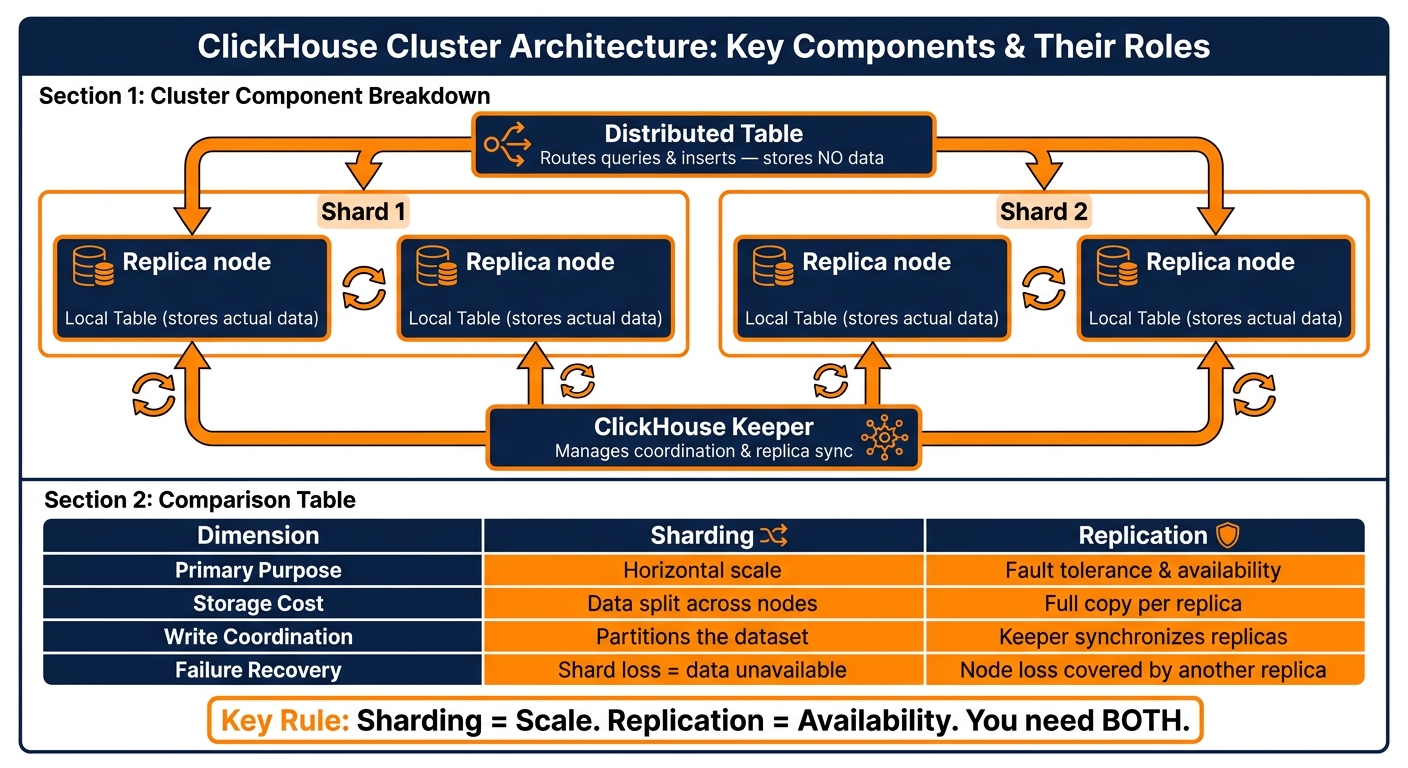
ClickHouse Architecture: Sharding vs Replication vs Partitioning vs Parts
Next, let’s look at how ClickHouse scales across nodes and stays available when a node goes down. ClickHouse stores data locally on each node, then ties those nodes together with sharding and replication. Those two parts shape how reads and writes move across the cluster.
7. What are the main components of a ClickHouse cluster?
A ClickHouse cluster consists of server nodes that store data locally. Those servers are arranged into shards, which split the dataset horizontally. Each shard can include one or more replicas - copies of that shard’s data stored on separate nodes.
A local table lives on each node and stores the actual data. A Distributed table sits above those local tables. It sends queries to the right shards and combines the results.
ClickHouse Keeper (or ZooKeeper) manages coordination. It tracks replica state, manages replication queues, and keeps replicas in sync.
| Component | Role | Data responsibility |
|---|---|---|
| Server | Executes queries and stores local data | Stores local data, executes queries |
| Shard | Divides data horizontally | Owns a subset of the full dataset |
| Replica | Keeps a shard available | Helps maintain availability |
| Local table | Stores data on one node | Stores the actual data |
| Distributed table | Routes queries and merges results | Holds no data; routes and merges results |
8. What is a shard and how does sharding work in ClickHouse?
A shard is one horizontal slice of a table. Each shard stores part of the dataset, and all shards together make up the full table.
Here’s the big interview point: sharding solves scale, not redundancy.
Sharding lets ClickHouse spread data across many nodes and run work in parallel. As Zach Wilson, Founder of DataExpert.io, puts it: "Highly scalable databases need partitions, this often comes at the cost of either availability or consistency."
But there’s a catch. If a shard fails, that slice of data may become unavailable unless replicas exist for that shard.
9. What is a replica and how does replication provide fault tolerance?
A replica is a full copy of a shard stored on another node. That way, data can stay available if one node fails.
ReplicatedMergeTree tables coordinate through ClickHouse Keeper, which manages replication and syncs replicas. Replication is what gives you fault tolerance and high availability. Sharding is what gives you scale.
| Dimension | Sharding | Replication |
|---|---|---|
| Primary purpose | Horizontal scale | Fault tolerance and availability |
| Storage cost | Data split across nodes | Full copy per replica |
| Write coordination | Shards partition the dataset | Keeper synchronizes replicas |
| Failure recovery | Shard loss can make data unavailable | Node loss can be covered by another replica |
That routing and replication model sets up the query flow and insert path covered next.
Query flow, inserts, and architecture synthesis
With storage and cluster layout in place, this section shows how ClickHouse handles reads, writes, and inserts.
10. What is the Distributed table engine?
The Distributed table engine is a stateless routing layer. When you query a Distributed table, ClickHouse breaks the query into shard-level subqueries, sends them to the right shards, and merges the partial results on the coordinator node.
For writes, it uses a sharding key - a column or expression - to decide which shard gets each row.
That routing model shapes the query path in the next answer.
11. What is the ClickHouse query execution flow?
A query moves through ClickHouse in a pretty clear sequence.
First, the server parses and plans the SQL. Then ClickHouse sends shard-level work to the right nodes and merges the results on the coordinator. On each shard, ClickHouse reads the relevant parts, applies filters, and returns a partial result. After that, the coordinator combines those partial results into the final output.
It helps to think of it like this:
- Coordinator node: parses the query, sends work to shards, and combines results
- Shard nodes: read local data parts, apply filters, and return partial results
Insert behavior follows the same storage rules, which is the focus of the final question.
12. How do inserts affect ClickHouse storage, and how do you design a table for scale and availability?
Every insert creates parts, and merges compact them later. Each insert creates new immutable parts, so small inserts can pile up fast. That's why batch inserts matter: they help keep part counts low.
For table design, the main ideas are pretty direct. Use partitioning for pruning, sorting for read locality, and replicas for availability.
A setup built for scale usually combines:
- Sharding for scale
- Replicas for availability
- Partitioning for pruning
A Distributed table can act as the cluster-wide entry point on top of the local tables.
Conclusion: Key ClickHouse architecture distinctions to remember
These ideas fit together in a pretty clean way. With ClickHouse, the core pattern is simple: shape data for fast reads first, then spread it out for scale and uptime.
Columnar storage cuts I/O because the engine reads only the columns a query asks for. MergeTree stores data as immutable, sorted parts, then background merges combine those parts over time. Those merges stop at partition boundaries. The sparse primary index works at the granule level, so it skips ranges that don't match a filter instead of pointing to exact rows. Partitioning is a coarse tool for pruning and data management, while ordering controls row sequence inside each part. Put plainly: partitioning prunes, ordering speeds up reads.
At the cluster level, that same logic splits into two jobs: data placement and fault tolerance. Shards divide the dataset for scale. Replicas copy those shards for availability. In a four-shard, two-replica cluster, you have four distinct data slices, and each one is duplicated once. The Distributed table handles query routing and inserts, but it doesn't store data itself.
Strong interview answers usually sound simple and sharp. Define what each part does, name the problem it solves, and mention one limitation or trade-off. That shows architectural judgment, not just memorized terms.