
Handling Schema Drift in Event Streams
A small schema change can stop a live stream in minutes. In this piece, I show the core fix: lock event contracts, test changes before release, watch lag/nulls/DLQ volume, and isolate bad records fast so one event does not block a whole partition.
If I had to boil the article down into a few points, it would be this:
- Schema drift starts at the contract: renamed fields, type changes, new required fields, timestamp format shifts, and meaning changes.
- Streaming systems fail fast: one bad record can trigger retries, partition stalls, and consumer lag right after a deploy.
- The damage spreads downstream: consumers fail first, then warehouse models, dashboards, features, and ML inputs.
- Not all drift is structural: a field can still validate while its meaning, unit, or category use changes.
- The fix is process + controls, often covered in a Data Engineering Mastery Course: pinned schema versions, CI checks, staging replay tests, bounded retries, DLQs, canary rollout, and replay plans.
A few signals matter most when I want to spot drift early:
- Consumer lag
- Deserialization failure rate
- Dead-letter queue volume
- Null-rate spikes
- Field distribution shifts
- Training vs. serving input mismatches
Here’s the short version: schema compatibility checks catch many breakages, but they do not catch silent business-logic damage. So if you only test names and types, you can still ship bad data that cuts revenue totals, drops feature values, or skews model output.
The article below explains where drift comes from, what it breaks, and how I’d contain it before it turns into an incident.
Streaming Schema Drift Discovery and Controlled Mitigation
sbb-itb-61a6e59
Where Schema Drift Comes From and How to Spot It
Schema drift usually shows up first as deserialization errors, nulls, or lag. Those are the early warning signs.
To catch it before it spreads, watch:
- schema-version counts
- failure rates
- null rates
- consumer lag
Then work backward from the symptom to the thing that changed, whether that's the producer, a connector, or the serializer.
Producer Changes That Break Contracts
The most common source is the producer itself.
Most drift starts with producer-side changes: renames, removals, type changes, or new required fields with no defaults. A simple rename like customer_id → customerId can leave consumers reading null for the old field name.
Semantic drift is more dangerous. The schema still validates, but the meaning changes under the hood. Say amount_cents starts representing dollars instead of cents. Deserialization still works, but a revenue dashboard now understates totals by a factor of 100. That's the kind of bug that slips past basic schema checks and quietly wrecks reporting.
Plain field-name checks won't catch that. You need contract tests that check units and value ranges too. And when you track the contract, use the schema ID or registry subject as the key, not the display name.
There's another messy case: multiple teams publish the same event name with different schemas. Consumers then process only part of the stream, and metrics start drifting apart.
Pipeline and Infrastructure Changes That Alter Schemas
If producer code hasn't changed, check connectors, serializers, and transforms next.
Those parts of the pipeline can reshape events even when the producer stays the same. And read-time schema inference can mask drift for a while, right up until a downstream query, feature, or API tries to read a missing field or the wrong type.
| Drift source | Usual first detection point | Likely downstream consequence |
|---|---|---|
| Required field added without a default | Schema registry or older consumer | Consumer lag |
| Field removed or renamed | Consumer logs, SQL transformations, dashboards | Null columns |
| Numeric type or unit changed | Warehouse load, validation rule, analytics query | Cast errors |
| Timestamp format or timezone changed | Windowed processor, partitioning job, warehouse | Misordered windows |
| One event name emitted in multiple versions | Topic consumer or data-quality monitor | Inconsistent metrics |
| Connector mapping or serializer changed | Connector logs or landing table | Dropped fields |
| Read-time schema inference changed | Warehouse query, transformation model, feature store | Late query failures |
Once you find the source, the next step is simple: map out what breaks downstream.
What Breaks Downstream When Event Schemas Change
Schema drift usually causes two kinds of downstream trouble: hard failures and soft failures.
Hard failures stop processing. Soft failures let the pipeline keep moving while the output gets quietly warped. That second kind is often worse, because nothing looks broken at first glance.
In most systems, the pain shows up in a predictable order. First, consumers struggle to read events. Then analytics jobs and warehouse transforms start going sideways. After that, model inputs begin to drift. Put simply: the first cracks appear where consumers read, then where warehouses transform, then where models use features.
Consumer Failures, Retries, and Lag
When a consumer runs into an event it can't parse, it usually retries. That sounds safe, but there's a catch: if the bad record sits at the front of a partition, every record behind it gets stuck too. Lag goes up. Partitions stall. The backlog starts piling up.
A team can choose to skip the bad event and get the stream moving again. But that fix comes with a cost: the skipped data is gone for good.
A safer option is to send the unprocessable event to a dead-letter queue (DLQ) with full diagnostic context. That means keeping:
- the original payload
- the schema version
- the error message
- the partition
- the offset
- the timestamp
This lets the main consumer keep moving while engineers get what they need to inspect the problem and replay the event after the schema or consumer is fixed. Without bounded retries and a DLQ, a single bad event can block an entire partition for an unlimited amount of time.
Replays bring their own risk. If offset commits trail behind writes, duplicates can show up. The best defense is idempotent writes tied to a stable event ID.
Analytics, Warehouse, and Dashboard Corruption
Warehouse failures are often easy to spot. Silent bad loads are not.
Take a renamed field. The load may not fail at all. Instead, the old column just starts filling with NULLs. Or imagine a numeric field changing into a formatted string like "$19.99". A cast may turn that into NULL too, which quietly lowers revenue totals in every downstream report.
This is where dbt-style transformation models can get hit hard. They often rely on stable column names, data types, and nested structures. A renamed field or a changed timestamp format can break a model halfway through a run. Worse, it can still finish and produce output that looks fine but isn't.
That kind of silent damage spreads fast. If some events were dropped or null-filled, any aggregation built on that partial dataset will be wrong, and there may be no clear error pointing to the cause.
| Symptom | Likely schema cause |
|---|---|
| Consumer lag rises after a producer deploy | New required field, renamed field, or incompatible encoding |
| Warehouse load rejects records | Type, precision, timestamp, or nested-structure change |
A column becomes mostly NULL |
Field removed, renamed, or failed cast |
| Dashboard totals drop without an ingestion outage | Partial loads, ignored fields, or changed event meaning |
| Feature values disappear | Missing field, changed path, or upstream nullability change |
| Model errors or latency increase | Inference input type, shape, or feature-order mismatch |
| Offline and online model performance diverge | Training-serving schema or transformation skew |
Feature Pipelines and AI Inputs Going Wrong
Schema changes can hit AI systems in two ways: structurally and semantically.
Structural problems are the easier ones to catch. A missing field or type mismatch can break batch construction or cause an inference request to be rejected. At least those failures are visible.
Semantic changes are trickier. They pass the shape check, but the meaning of the data has changed.
For example, say a field called customer_status used to mean "trial or paid" and later shifts to a broader "subscription lifecycle state." The type is still a string. Structural validation may still pass. But the model was trained on the old meaning, and now it is getting something else. Predictions keep flowing, but accuracy starts slipping.
Google's production-ML guidance calls this training-serving skew and recommends checking training and serving inputs against the same schema while also watching missing-value rates and feature distributions.
That’s the heart of the problem: structural compatibility by itself does not protect model behavior.
A stronger check needs to look at more than names and types. It should verify things like:
- units
- null handling
- category meanings
- value ranges
- representative offline-versus-online feature vectors
That’s why schema changes need versioned contracts, compatibility checks, and staged rollout controls.
The next step is to prevent drift with pinned contracts, compatibility tests, and bounded failure handling.
How to Prevent and Contain Schema Drift in Production
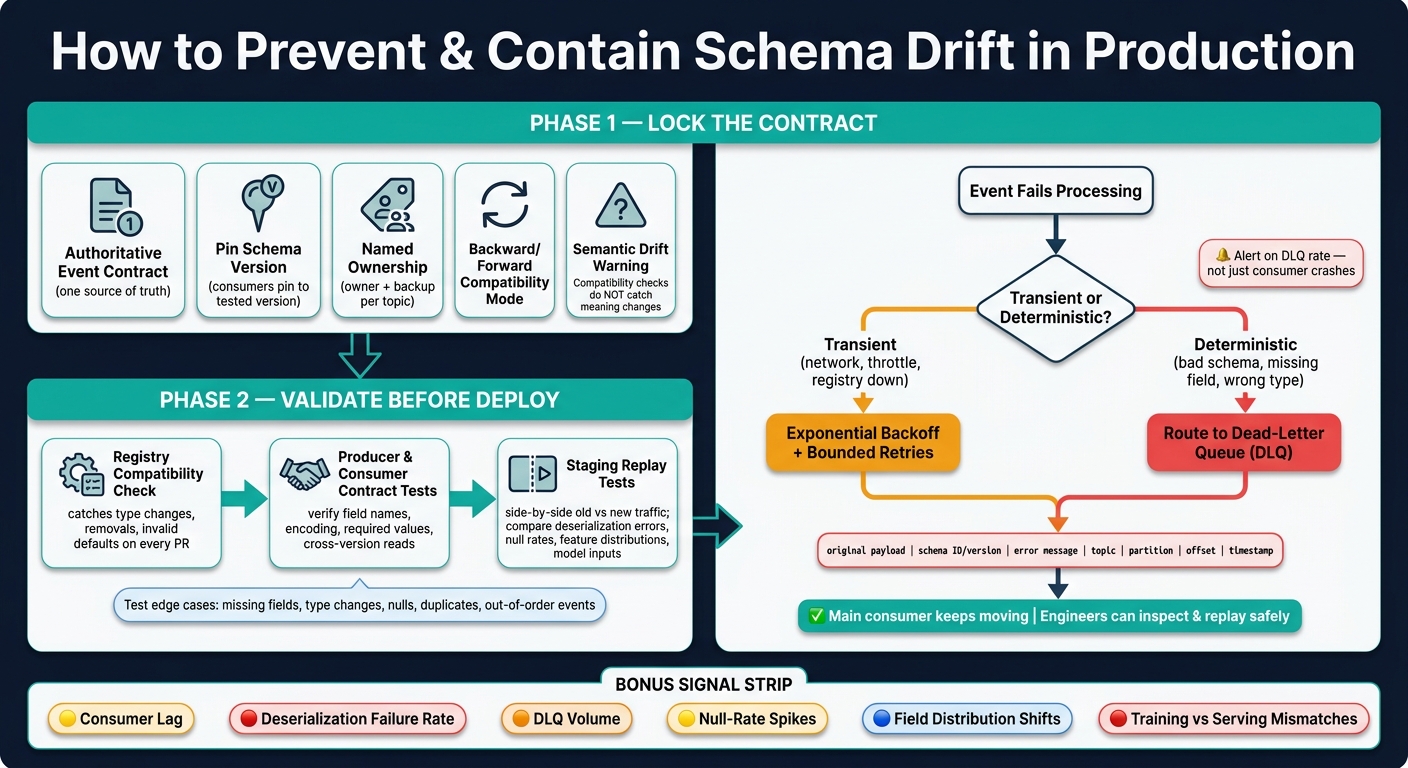
Schema Drift: Detection, Containment & Safe Rollout Process
Use these controls to stop lag, null loads, and bad model inputs before they spread.
The best time to stop schema drift is before a single event hits a consumer. In practice, that comes down to three things: lock down what an event can look like, catch problems before deployment, and isolate bad records if one still gets through.
Define an Authoritative Event Contract and Pin Versions
Every event topic needs one source of truth. That contract should spell out the version, field names and types, required and optional fields, units, defaults, ownership, and deprecation rules.
Store the contract in a controlled schema registry or a versioned repository. Any change should go through code review. Each topic should also have a clearly named key schema and value schema, so there’s no confusion about what the topic is meant to carry.
Consumers should pin to a tested schema version, not quietly accept whatever shows up. That matters a lot during replay. If the same version and parser are used later, replay stays reproducible instead of turning into guesswork.
Use backward or forward compatibility for controlled rollouts. Full compatibility should be saved for cases where producer and consumer changes can overlap without trouble. One catch: compatibility tests won’t catch semantic drift. A field can still pass validation even if its unit changes or an enum value gets redefined.
Once the contract is pinned, validate it in CI and staging before rollout.
Run Compatibility Tests in CI and Integration Tests in Staging
A compatibility check at registration time is necessary, but it’s not enough by itself. A practical workflow adds three layers before production:
- Registry compatibility check: catches incompatible additions, removals, type changes, and invalid defaults on every pull request and schema registration attempt.
- Producer and consumer contract tests: verify field names, encoding, required values, and whether consumers can read events across supported versions.
- Staging replay tests: confirm topic wiring, registry access, warehouse loading, dashboard transformations, feature generation, and model-serving input behavior before production deployment.
It also helps to test the stuff that usually breaks pipelines in the messiest way: missing fields, type changes, timestamp changes, null handling, unknown values, duplicates, and out-of-order events.
A staging topic should receive both old and new producer traffic. That side-by-side setup lets teams compare deserialization errors, record counts, warehouse null rates, feature distributions, and model-input validation results before the full cutover.
If a bad event still slips through, don’t let it jam the whole system. Contain it with bounded retries and a DLQ.
Use Dead-Letter Queues and Bounded Retries to Isolate Bad Events
Not every failure should be treated the same. Retry transient failures. Send deterministic schema failures to a dead-letter queue.
Transient errors, like temporary network issues, registry unavailability, or throttling, are good candidates for exponential backoff with a bounded attempt count. Deterministic failures, like an unsupported schema version, malformed payload, missing required field, or incompatible timestamp, should go straight to a dead-letter topic instead of blocking a partition forever.
A dead-letter record needs enough context for safe diagnosis and replay. That includes the original payload, schema ID or version, error message, topic, partition, offset, and timestamp. Keep that data under controlled access, and retain it long enough for investigation and replay.
| Action | Appropriate use | Main tradeoff | Risk of silent data loss |
|---|---|---|---|
| Retry | Transient infrastructure or dependency failure | Can increase lag and repeatedly process a bad record | Low if attempts and alerts are bounded |
| Dead-letter routing | Deterministic schema or validation failure, or exhausted retries | Requires triage, retention, and replay operations | Low if monitored and retained |
| Replay | After fixing the schema, producer, or consumer | Can create duplicates or reorder side effects | Low for recovery, but operational complexity is high |
Alert on dead-letter rate, not just consumer crashes. Otherwise, the pipeline can look fine on the surface while data quietly disappears.
Roll Out Schema Changes Safely and Build a Long-Term Operating Model
Stage Changes Before Full Producer Cutover
Once validation is done, rollout becomes the last checkpoint before producer traffic changes.
A safe schema migration follows a simple rule: register first, switch producers last. Register the schema, make sure consumers are ready, and only then move producer traffic. Start with a canary slice. If the checks hold, expand step by step.
During rollout, watch the signals that usually show trouble first:
- compatibility errors
- consumer lag
- dead-letter volume
- null rates
- field distributions
- warehouse load results
- model-input quality compared with the control path
If any of those move in the wrong direction, stop the rollout right away. Route failed events to quarantine, roll back producers, and dig into the cause before traffic grows again.
| Rollout phase | Validation gate | Monitoring signal | Rollback trigger |
|---|---|---|---|
| Register and review | Owner approval, documented intent, compatibility test passes | Registration errors, affected-consumer inventory | Any incompatible consumer or undocumented semantic change |
| Prepare consumers | Old and new fixtures pass; dual-read or dual-write tested | Test failures, normalization errors, output mismatches | Consumer cannot safely process either version |
| Canary release | Small traffic slice meets success thresholds | Error rate, lag, retries, DLQ volume, null rates | Threshold breach or sustained lag growth |
| Expand traffic | Warehouse, dashboard, feature, and model checks pass | Load failures, field distributions, model-input quality | Data-quality or AI-input regression |
| Full cutover | All consumers migrated and replay test complete | Version adoption, residual legacy traffic, freshness | Unexpected legacy dependency or unresolved failures |
| Retire old version | Deprecation notice sent, archive retained, rollback window closed | Late old-version events and replay requests | Reappearance of unsupported old events |
For transition periods, use dual-read. Use dual-write only when downstream migration needs a period of overlap, and set a hard end date. If you leave dual-write open-ended, it tends to stick around far longer than anyone planned.
Track Ownership, Drift Signals, and Replay Readiness
Once cutover begins, clear ownership and semantic monitoring help keep drift from slipping through unnoticed.
Every event contract needs a named owner and a backup. That person is on the hook for reviewing schema changes, settling semantic disputes, and keeping the contract docs up to date. That includes compatibility mode, downstream consumers, retention period, and deprecation date.
You also need to track the signals that hint at drift, even when the physical schema still looks fine. That means watching null rates, cardinality, ranges, quantiles, category frequencies, timestamp freshness, event-volume ratios, and relationships between related fields. If meaning changes in a material way, treat it as a new contract version, even if the field type stays the same.
Replay readiness is one of those things teams often skip until an incident lands in their lap. Before full cutover, replay a representative historical sample through the new consumer in an isolated environment and compare the outputs against the current production consumer. Check that replay is idempotent, that side effects are deduplicated, and that downstream loaders and models can accept historical records.
It also helps to write down the full playbook ahead of time: quarantine, remediation, replay, and rollback steps, plus who can approve each one. Then test those procedures on a schedule, not just when something breaks at 2:00 a.m.
Conclusion: The Control Loop for Schema Drift
Schema drift tends to start in familiar ways: an uncoordinated producer change or a quiet infrastructure update that catches consumers off guard.
The most dependable response is a continuous operating loop. Detect drift early with semantic monitoring, contain bad events with dead-letter queues, expand production traffic in clear stages, and assign a named owner to every contract. Schema governance is not a one-time deployment task. It’s an operating habit that needs to be built and practiced well before the next breaking change shows up.
FAQs
How do I tell schema drift from a transient outage?
Check the failure pattern. Schema drift tends to show up as structural mismatches: unexpected column names, changed data types, or new fields that break existing contracts and trigger deserialization errors or exceptions such as UnknownFieldException.
A transient outage is usually temporary and may go away on retry. If errors keep showing up across retries or keep hitting the same data structures, schema drift is the more likely cause.
When should a schema change create a new version?
Create a new schema version for breaking changes that need migration or can’t be handled with backward-compatible updates. Under semantic versioning, any change that disrupts existing consumers should trigger a major version increment.
That includes changes like:
- Renaming fields
- Removing required elements
- Changing data types in incompatible ways
When that happens, move to a versioned stream such as payments-v2, and keep the original topic in place until consumers migrate.
What should be in a replay plan?
A replay plan should protect data integrity and system stability during recovery.
Make the sink idempotent so duplicate writes can be handled safely. Use checkpointing too, so offsets and internal state can pick back up from the last stable point.
If schema drift caused the failure, validate the schema through a registry before restarting. It also helps to use dead-letter queues to isolate bad records, so they don’t interrupt the replay.